Backing Up SegmentFault Articles with Python
An investigation of SegmentFault authentication followed by a Python article-backup tool using Selenium, PhantomJS, and Tornado.
Why a direct POST failed
On many sites, a direct POST signs you in and returns a cookie that you can then reuse however you like. Unfortunately, failure is always possible.
I first logged in manually and inspected the request in Chrome’s Network panel. It contained three fields:
mailpasswordremember
The endpoint was http://segmentfault.com/api/user/login?_=0b1bc2ca95203748b804e69ac2cfab06. The trailing 32-character token changes on every request. To find where it came from, I set breakpoints in Chrome DevTools—after formatting the source with {}—and started at the code that sent the XHR. I narrowed the call stack step by step until I found where the token was appended. It was a fairly tedious process.
The value turned out to be window.SF.token. Searching for it reveals an existing SegmentFault article about simulating the login with Node. I did not use that article: I only discovered it after finding window.SF.token myself. Searching all JavaScript files for _= would have been a somewhat opportunistic shortcut.
Because the value is attached to window, it cannot be hidden by JavaScript minification or obfuscation. There had to be an assignment somewhere, and a little searching showed it directly in the login page’s HTML.
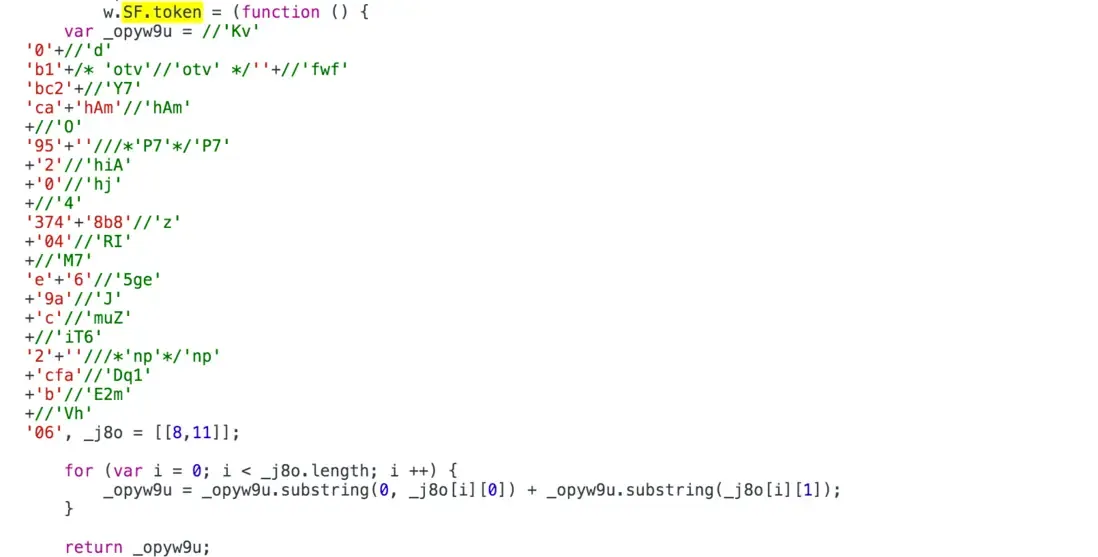
I fetched the page with Python, extracted the code containing the token, including the numbers in its for loop, calculated the token by every means I could think of, and submitted it. The request failed. I then added headers and cookies to mimic a browser. The cookies at this point were anonymous and contained no valid session value; I included them only as a precaution. The POST then succeeded, but the session was still not logged in.
I inspected the manual login again and found several other XHR requests. Brief experiments to reproduce them did not succeed. Analysis suggested that a cookie named sr_remember was the effective login marker, but I could not determine exactly how it was set. The current login flow involved too many callbacks and redirects, making it inefficient and unreliable to reproduce one request at a time in Python.
Using PhantomJS
The simplest option was to emulate a browser’s JavaScript environment from Python. I tried Ghost.py, but it was a trap: pages appeared to crash as soon as they used features such as localStorage. It also depends on PySide, which is painful to install. If you do install it, avoid building from source; otherwise pip install PySide may appear to do nothing for a very long time. At least a binary package gives you some feedback—the build may take tens of minutes. I could not install PyV8, apparently because of El Capitan, so I gave up on it.
I eventually chose selenium with PhantomJS. Selenium can drive PhantomJS directly and is convenient. At that moment I understood why PySpider used PhantomJS.
As described above, PhantomJS performs the login and obtains the cookie. Python can then use that cookie to fetch and back up the articles. I added some concurrency with tornado; the code is available on GitHub. Feedback is welcome.
That is all.