I/O, Memory, and File Systems
Notes on the Linux I/O stack, raw devices, journaling, buffering, Direct I/O, and Concurrent I/O.
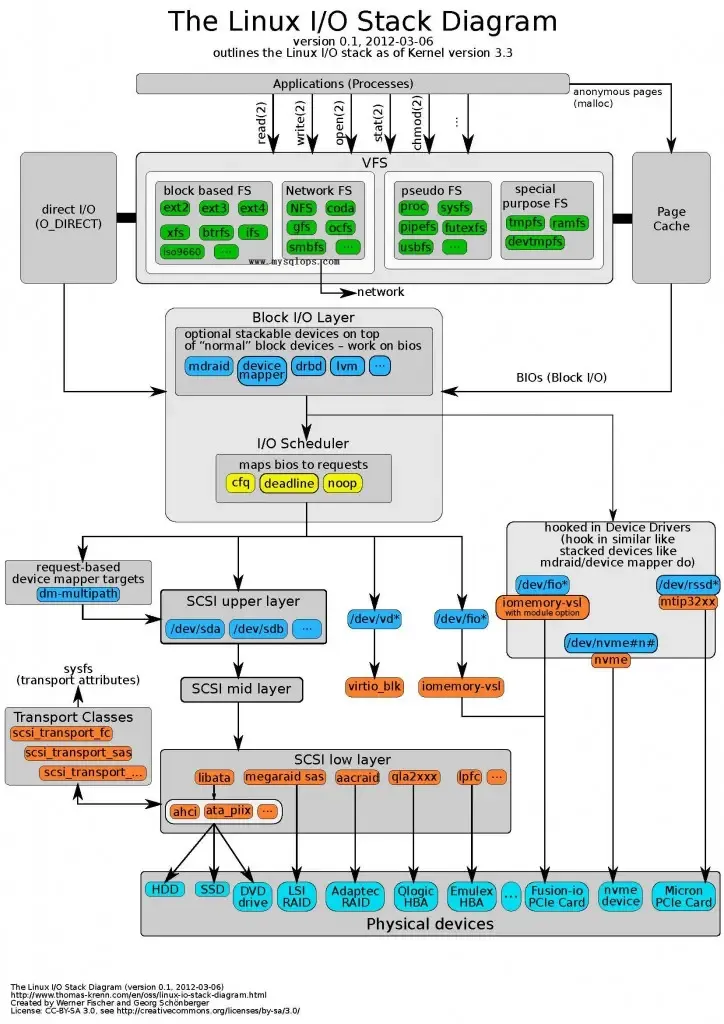
The Linux I/O stack
Reading and writing raw devices
Reading and writing raw devices is widely considered one of the fastest ways for a database to do I/O. Oracle databases generally store both logs and data on raw devices.
What is a raw device?
On Unix/Linux, files fall into two broad categories: character device files and block device files.
A raw device is a special block-device file that has not been formatted and is not read through a Unix file system. It is also called a raw partition. Raw devices are read and written through a character-device driver.
Advantages of raw devices
Raw devices are not managed through the Unix/Linux file system, so they avoid some file-management overhead. A file system is an abstraction over a physical disk, and maintaining all the logic for that abstraction costs something.
Operations on raw devices do not use the system buffer. Data moves directly between Oracle’s data buffer (BUFFER CACHE) and the disk. This can improve I/O performance to some extent and suits high-I/O workloads.
Disadvantages
- Capacity is inconvenient to manage and must be planned in advance.
- Creating and extending raw devices requires root privileges.
Writing logs
Writing logs is one of the common ways databases guarantee reliability. File systems themselves are not fully reliable, so transactions use logs to guarantee consistency. See crash consistency: in several situations, a file write may appear complete, but after a failure and recovery it turns out not to have succeeded.
Journaling and non-journaling file systems
A journaling file system tracks changes to files. In theory, a file of the same size takes slightly more space on a journaling file system, but the journal provides capabilities such as faster recovery.
On a non-journaling file system, when a write occurs, the operating system first modifies file-system metadata and then writes the actual data.
If the system crashes or loses power while the metadata is being modified, the file system can be damaged. Compared with a non-journaling file system, a journaling file system has a separate journal area. Depending on the mode, it can write the log first or the data first.
Most journaling file systems support three modes: writeback, ordered, and full journal. Ordered mode is the default: it writes data first and then the journal. Linux ext2/ext3/ext4 are all journaling file systems. Windows NTFS is one as well.
Logging algorithm WAL: Write-Ahead Logging. HBase and MySQL both use WAL. Its basic process is:
- Before changing a record, write the log first.
- While committing a transaction, make sure the log reaches disk before the transaction counts as committed.
WAL can improve database performance while preserving transaction properties.
Buffered I/O, unbuffered I/O, and Direct I/O
Buffered and unbuffered I/O
Linux divides file I/O into unbuffered I/O (file I/O) and buffered I/O (standard I/O). Standard I/O conforms to ANSI C, does not depend on the system kernel, is portable, and can reduce calls to read and write. It creates a buffer in user space when reading or writing a file.
Unbuffered I/O is not direct disk I/O. It only means there is no user-space buffer; the kernel still buffers it through system calls. The operating system caches I/O data in the file system’s page cache.
The difference is that unbuffered I/O writes to disk on each write, while standard I/O has a buffer and writes only when the buffer is full or the program calls flush or close. In the end, both call unbuffered C standard I/O functions, including the system functions open, read, write, and close.
Standard I/O uses malloc to allocate a buffer. There are three types:
- Fully buffered: I/O happens only after the standard I/O buffer is full. Disk files are usually fully buffered.
- Line buffered: the standard I/O library performs I/O when input or output meets a newline or the buffer is full.
stdinandstdoutare commonly line buffered. - Unbuffered: equivalent to
read/writecalls.stderris usually unbuffered because it must be output promptly.
stdin and stdout are fully buffered by default but line buffered in a terminal. On Linux, line buffers are 1 KB and full buffers are 4 KB. Because of Linux’s lazy mechanism, a buffer is allocated only when actual input or output occurs.
Buffered I/O separates kernel and user space to some extent, protecting the system while reducing disk reads and improving performance. On the other hand, DMA reads data from disk into the page cache or writes data from the page cache back to disk; it cannot transfer data directly between application address space and disk. Multiple copies can therefore cost substantial CPU and memory.
Data flow:
- Unbuffered I/O: data → kernel buffer → disk
- Standard I/O: data → stream buffer → kernel buffer → disk
CIO/DIO
CIO/DIO is generally used in databases, for example when reading and writing raw devices.
DIO means Direct I/O. It interacts directly with the disk, reading disk data into a user-space buffer or writing user-space memory directly to disk. It does not use the kernel cache; it uses its own cache instead.
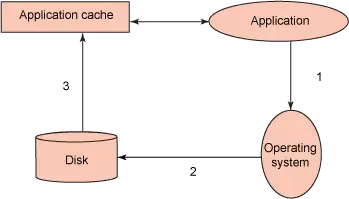
CIO means Concurrent I/O. When several processes access the same file, inode contention appears. Reads use a shared lock, so multiple reads can run concurrently; writes use an exclusive lock. When a writer holds the lock, every other operation is blocked, and the application’s performance drops sharply.
When a file system supports and enables CIO, CIO enables the file system’s DIO by default. Data storage does not go through the data buffer and runs serially. The file-system layer therefore does not need to consider data consistency. CIO depends on the underlying driver.
To be continued.
References